
Support my music
Goodies · Free VST3 & AU plugin
PumpFlow
Duck anything in time with the kick, no routing needed
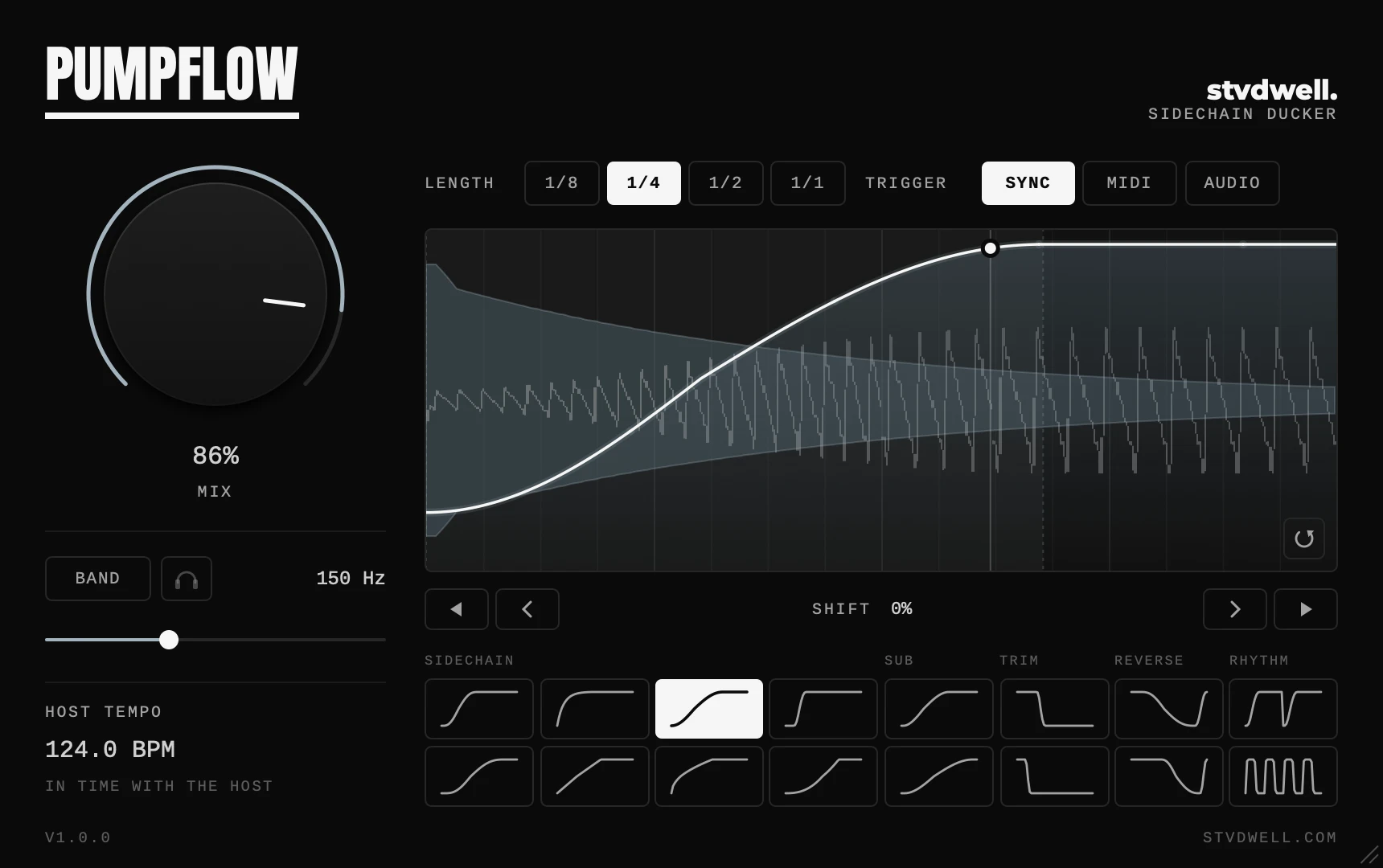
Put PumpFlow on a bassline, a pad or a whole bus and it pulls the volume down on every beat, the way a sidechained compressor would. Pick a curve, set how deep it goes, and drag the curve to fit your kick.
Features
-
16 curves
Eight sidechain shapes from snappy to slow, two for sub bass, two that trim a kick’s tail, two that pull the sound back before the beat, and two rhythmic chops.
-
Fits any kick
Drag the curve to make each duck shorter or longer, and nudge it in time with the arrows. Your sound and the kick are drawn behind the curve, so you can line them up by eye.
-
Follows any rhythm
Sync locks to your tempo. MIDI restarts the curve on every note. Audio follows the hits in a sidechain input, for kick patterns that aren’t four to the floor.
Demo
Specs
Controls
- Mix
- 0 – 100%
- Curves
- 16, in five groups
- Length
- 1/8, 1/4, 1/2 or a bar
- Trigger
- Sync, MIDI or Audio, looped or one shot
- Slope & Shift
- Drag the curve; nudge in 1/16 or 1/256 steps
- Band
- Duck below 20 Hz – 5.12 kHz only
System requirements
- macOS
- 10.15 or later, Apple silicon or Intel
- Host
- Any DAW that loads VST3 or AU plugins
- Format
- VST3 and Audio Unit
- Latency
- None; 5 ms with the Audio trigger
Download & install
- Close your DAW if it’s running
- Unzip the download and open the macOS folder
-
Copy
PumpFlow.vst3into your VST3 folder, andPumpFlow.componentinto your Components folder too (Logic Pro and GarageBand use it). Create a folder if it doesn’t exist: macOS/Library/Audio/Plug-Ins/VST3macOS AU/Library/Audio/Plug-Ins/Components - Open your DAW. PumpFlow appears after its plugin scan; rescan if it doesn’t. In FL Studio, open Options › Manage plugins and click Find installed plugins.
Tips and troubleshooting
- If you see a security warning, open System Settings › Privacy & Security and allow PumpFlow, then reopen your DAW.
- To duck from the kick itself, choose the Audio trigger and send the kick into PumpFlow’s sidechain input; how depends on your DAW. With no sidechain, the Audio trigger listens to the track PumpFlow is on.
- Band ducks only the low end, so a pad or a full mix keeps its top while the bass makes room. The headphones button plays just the part being ducked.
More from stvdwell
Free MIDI effect
KeyFlow
Play in any scale from the white keys
14 scales, no repeated notes. An Audio Unit for Logic Pro and a VST3 for FL Studio.